
Areas nearby
The Areas tab lists the WWFF references around your position, within the distance you chose in Settings (10, 25, 50 or 100 km). References across the border are in it too.
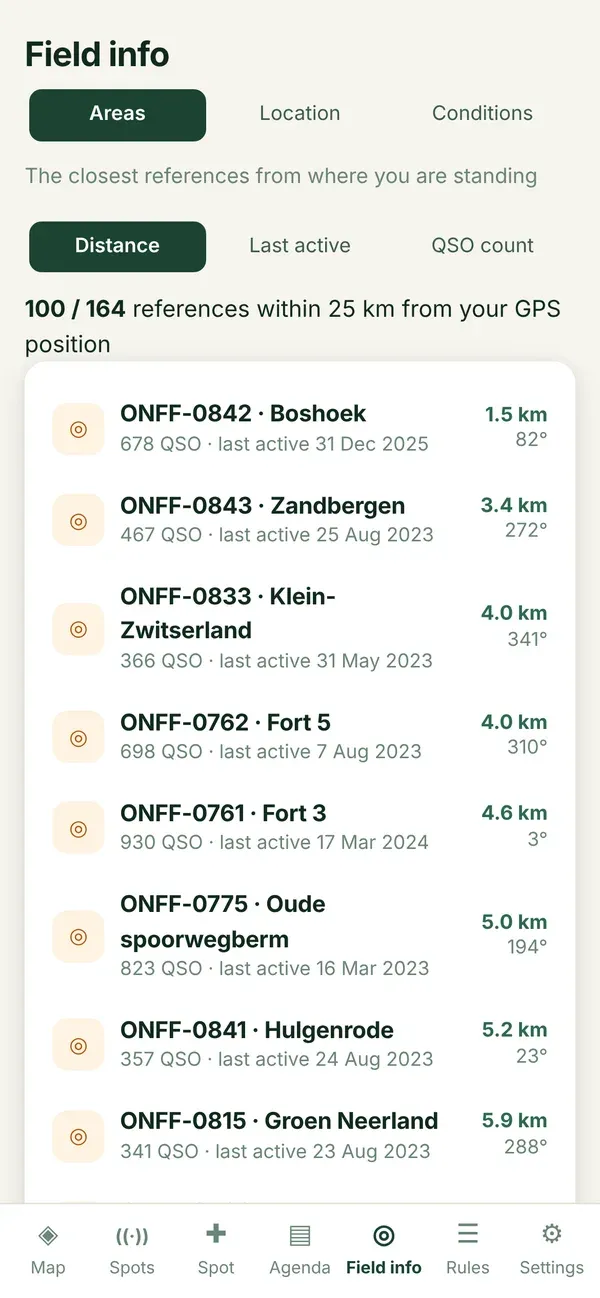
One line per reference
Section titled “One line per reference”| What you see | Meaning |
|---|---|
| Reference and name | For example ONFF-0842 · Boshoek. |
| Distance and bearing | In a straight line from you, for example 1.5 km · 62°. |
| QSO count | How many contacts were made from there, according to the WWFF directory. |
| Last active | The date of the last activation. |
| no activation date known | The directory has a reference but no date. |
| not in the WWFF directory | Diana knows the area, but the directory has nothing on it. That does not mean it was never activated. |
Sorting: which order to choose?
Section titled “Sorting: which order to choose?”| Button | When to use it |
|---|---|
| Distance | The nearest first. When you want to set up quickly. |
| Last active | The areas that were off the air the longest first. That is where a pile-up is most likely. |
| QSO count | The least worked areas first. When you want to give hunters a new one. |
Opening an area
Section titled “Opening an area”- Tap a line.
- The map opens, zoomed in on that area, with its panel and boundary.
- More than a hundred areas nearby? Tap Show more at the bottom.
Changing the distance
Section titled “Changing the distance”Settings › Field info › 10, 25, 50 or 100 km. See Field info distance.