
The setup wizard
Right after the welcome screen, a short wizard sets up Diana for your station. It takes about a minute. Every answer is saved the moment you give it, so stopping halfway loses nothing.
The steps
Section titled “The steps”- Language. The wizard starts in English. Tap your language: EN, NL, FR, DE, DA, IT, ES or PT. Everything switches at once.
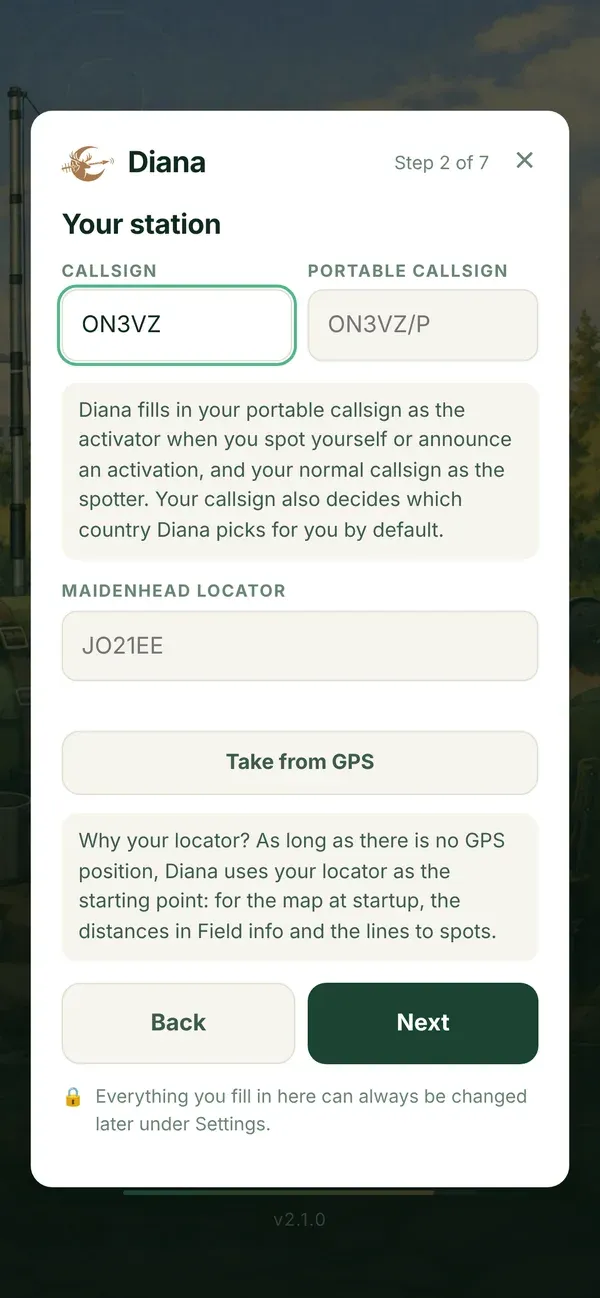
- Your station.
- Callsign: your normal callsign, for example
ON3VZ. Diana uses it as the spotter, and it decides which country Diana picks for you. - Portable callsign: what you use in the field, for example
ON3VZ/P. Diana fills it in as the activator when you spot yourself or announce. - Maidenhead locator: six characters, for example
JO21EE. Tap Take from GPS to fill it in from your position. As long as there is no GPS position, Diana starts from your locator: for the map at startup, the distances in Field info and the lines to the spots.
- Callsign: your normal callsign, for example
- Your country. Which country Diana loads with its real boundaries. Diana proposes one based on your callsign. See Your country.
- Quick words. Five words you can add to a spot’s remark with one tap. Tap Fill in example words for a start, or leave them empty: an empty field simply gives no button.
- Band list. All bands (160 m to 23 cm) or HF only (80, 40, 30, 20, 15 and 10 m) for the list when you announce an activation.
- Statistics. Only if you did not say yes yet: a second, polite question whether you want to help with anonymous statistics.
- Done. Your settings are saved. They stay in the browser of this device as long as you do not clear the browser data.
Use Next and Back to move between the steps. Skip introduction stops the wizard; you can always fill in the rest under Settings.
Then: the tour
Section titled “Then: the tour”At the end, Diana offers a short tour. See The tour.