
The map screen
The map is the main screen of Diana. Everything else starts from here.
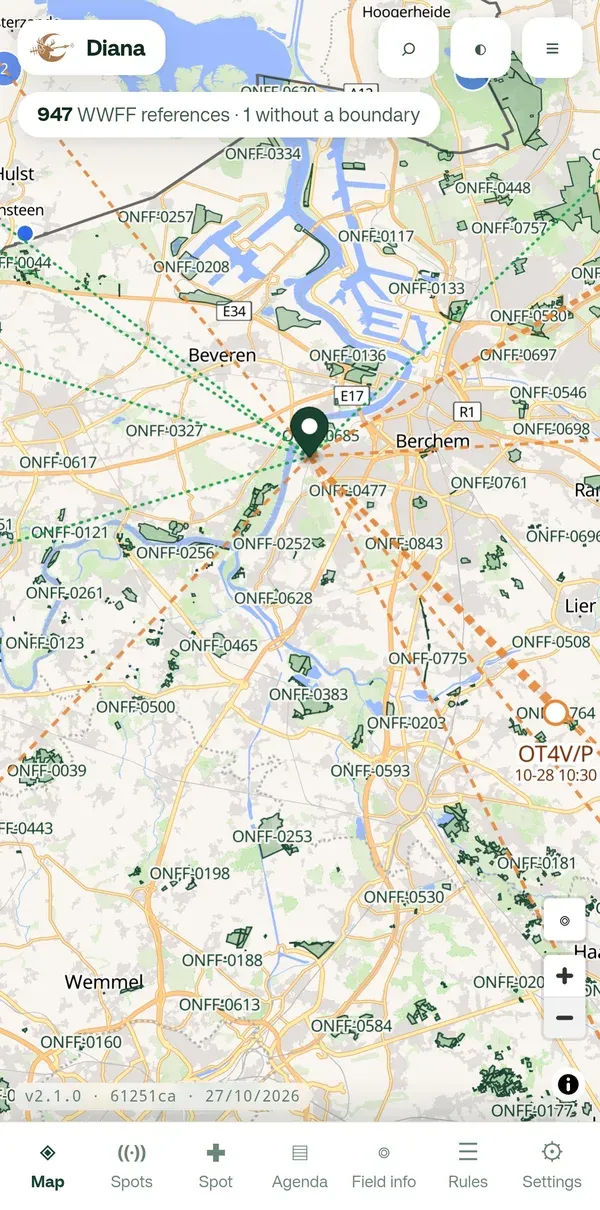
The bar at the bottom
Section titled “The bar at the bottom”From left to right: Map, Spots, Spot, Agenda, Field info, Rules and Settings. Tap one to open that screen.
The buttons at the top
Section titled “The buttons at the top”| Button | What it does |
|---|---|
| ⌕ | Search by name or reference number. See Searching. |
| ◐ | Map style: Liberty, Positron, Bright or Dark. |
| ≡ | Layers and language. See Layers and map style. |
At the top left a line says how many references are loaded, for example “947 WWFF references · 1 without a boundary”.
Moving around
Section titled “Moving around”- Drag with one finger to move the map.
- Pinch with two fingers to zoom in or out, or use + and − at the right.
- Tap an area, a point or a spot to open its panel. See Area details.
What do I see?
Section titled “What do I see?”The colours, points and lines are explained in Reading the map. Why one reference is an area and another only a point is explained in Points and areas.