
Announce an activation
Planning an activation? Announce it, so hunters are ready. The announcement goes to the WWFF agenda on Spotline.
Three ways in
Section titled “Three ways in”- Agenda in the bottom bar.
- + Announce on the Agenda tab of the Spots screen.
- Announce an activation in the panel of an area: the reference is then already filled in.
Step by step
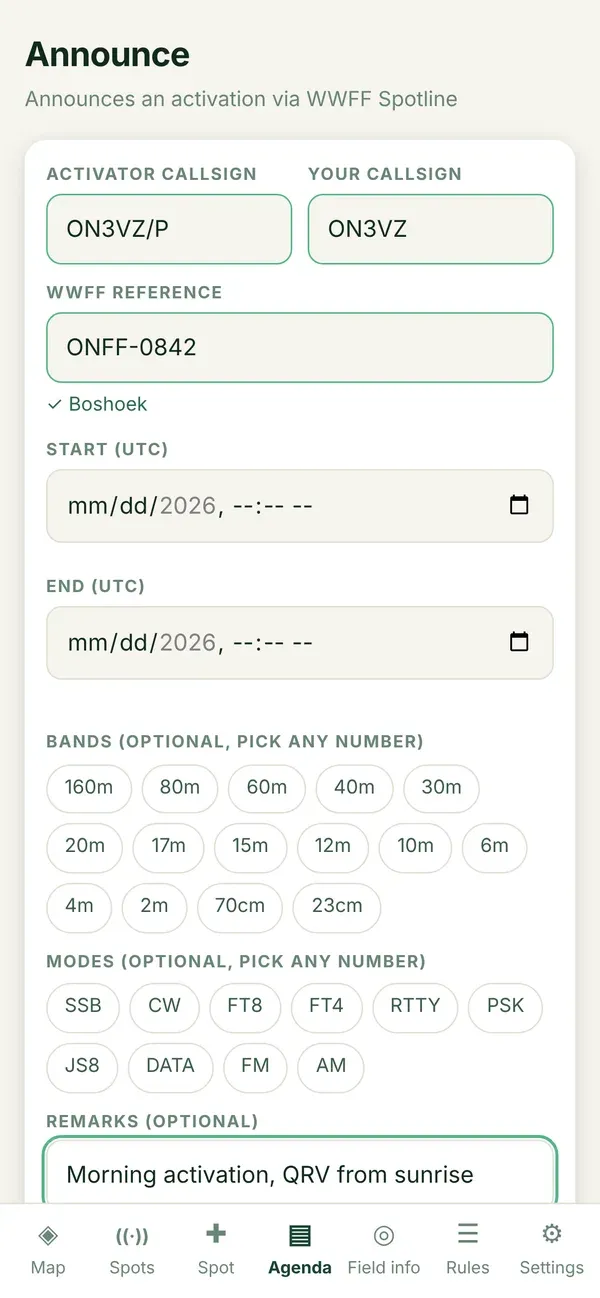
Section titled “Step by step”- Check the activator’s callsign and your own callsign. Someone else may announce for an activator.
- Fill in the WWFF reference, for example
ONFF-0104. - Choose start and end. You pick them on the clock of your own device; Diana converts them to UTC before they leave your device.
- Optional: tick the bands and modes (several are possible, for example 40 m, 20 m · CW, SSB) and add a remark.
- Tap Check, and when it is accepted, Send announcement.
- Write down your PIN.
Limits
Section titled “Limits”- At most one month ahead, and the end not before the start. Spotline applies the same rules.
- At most 16 announcements a day from one device through Diana, to protect the shared budget. Normal use stays far below that.
- There is no “old way” for announcements. If it does not work, try again later.
Which bands the list offers (all, or HF only) is a setting: Band list when announcing.