
Who is on the air
Tap Spots in the bottom bar. The screen Spots & agenda shows who is on the air from a WWFF area right now. The list comes live from WWFF Spotline and refreshes every 30 seconds.
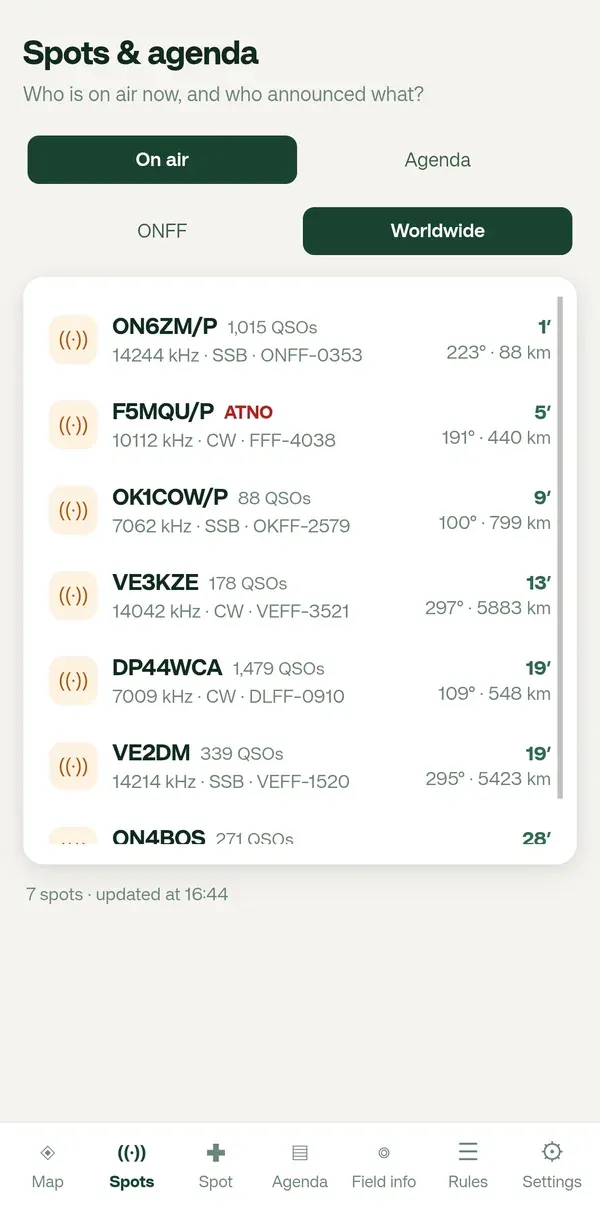
One line per station
Section titled “One line per station”| What you see | Meaning |
|---|---|
| Callsign | The activator, for example F5MQU/P. |
| QSO count | How many contacts were made from that reference before, according to the WWFF directory. |
| ATNO in red | All Time New One: this reference was never activated before. A hunter’s favourite. |
| Frequency, mode, reference | For example 10112 kHz · CW · FFF-4038. |
| Minutes | How long ago the spot came in. |
| Bearing and distance | From you, for example 191° · 440 km. |
Your country or worldwide
Section titled “Your country or worldwide”Under the tabs you choose your country (for example ONFF) or Worldwide. Diana remembers the choice, and keeps it in step with the same setting in Settings. Which country the button stands for follows your country setting: until you pick one, Diana takes it from your callsign (ON… gives ONFF, PA… PAFF, DL… DLFF).
Opening a spot
Section titled “Opening a spot”- Tap a line.
- The map opens, zoomed in on that area, with a sheet: frequency and mode, the reserve, the locator there and yours, the remark, the QSO count, More info and a compass with the bearing.
- ← Back to Spots, or the back button of Android, takes you back to the list.
- × or swiping down closes only the sheet and keeps the map.