
Spot yourself
On the air and ready? Spot yourself, so hunters can find you. The spot goes to WWFF Spotline and from there to the DX cluster.
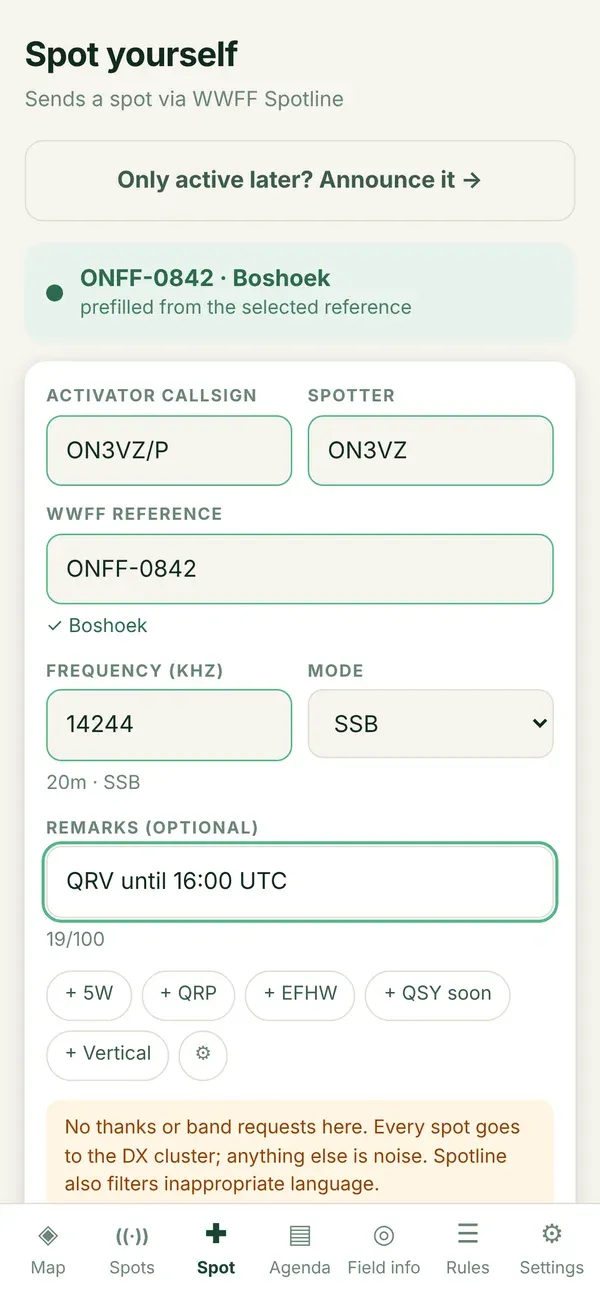
Step by step
Section titled “Step by step”- Tap Spot in the bottom bar, or Spot yourself here in the panel of an area.
- Check the reference. If you are inside an area, or came from a panel, Diana has already filled it in and says where it came from.
- Your callsigns come from Settings: the portable callsign as activator, your normal callsign as spotter.
- Fill in the frequency in kHz, for example
7144, and choose the mode. - Optional: a short remark, up to 100 characters. Tap one of your quick words to add it with one tap.
- Tap Check. Spotline looks at your spot without placing it, and tells you what it thinks.
- Is it accepted? Tap Send spot. You get a confirmation with the number of your spot.
Why first Check, then Send?
Section titled “Why first Check, then Send?”Every request to Spotline comes out of a budget shared by all users. Check makes sure a spot is right before it costs a real send. Change anything after checking, and Send closes again: the approval was for the spot you had then.
What Diana checks for you
Section titled “What Diana checks for you”- The callsign format, the frequency range and the remark length, just like Spotline.
- The band plan: a warning when your mode does not match the segment of your frequency.
- The reference, against Diana’s own list. That answers at once, even without signal.
When something goes wrong
Section titled “When something goes wrong”- Pressed twice on a bad connection? Diana says the spot was already there. Nothing is placed twice.
- Spotline refuses? You get Spotline’s own explanation.
- Sending does not work at all? Diana offers Send the old way: the spot goes to Spotline’s own form in a new tab. You see their answer yourself, but Diana cannot confirm it.
Not on the air yet, only planning? Use the agenda: Announce an activation.